The Value of a "Paper App" in Game Design
- -->> 5. The Value of a "Paper App" in Game Design
What you'll learn
 What is a "Paper App"Benefits in Early DesignWhen to Move to Prototyping
Before a single line of code is written or a single pixel is rendered, a great video game begins with an idea. The "paper app" is a crucial, foundational step in transforming that idea into a tangible concept. A paper app is a non-digital, low-fidelity prototype of a game's core systems and user experience. It's a method of rapid prototyping that relies on simple, accessible tools like pen and paper, whiteboards, or digital brainstorming software. By using these simple mediums, developers and designers can quickly visualize and test user flows, UI mockups, and early character designs without the time commitment of a full digital build.
What is a "Paper App"?
A paper app is a tangible representation of your game's intended functionality, created with minimal effort. Think of it as a game's storyboard, where each sheet of paper or whiteboard section represents a different screen or state. You can draw out menus, user interfaces, and how a player would navigate from one screen to the next. For example, a main menu screen on one piece of paper might have an arrow pointing to a "character creation" screen on another. The goal is not to create a beautiful piece of art, but rather a functional, easy-to-change map of the player's journey through the game.
The beauty of this method lies in its simplicity. Anyone on the team—from a programmer to a marketing specialist—can contribute and understand the vision. It removes the barriers of technical skill and expensive software, allowing for a free-flowing, collaborative brainstorming session where the best ideas can quickly emerge.
Benefits for Early Design Elements
Using a paper app provides immediate, high-value feedback on some of the most critical parts of a game's design. This is where you can catch fundamental flaws and brilliant new ideas before they become difficult to change.
-
User Flows: By laying out the entire player journey on paper, you can identify areas of friction or confusion. Does the path from the main menu to the first level make sense? Is the tutorial flow logical? You can have team members or even potential players "walk through" the paper app, tapping on the screens and providing real-time feedback. This kind of user testing is invaluable and far more agile than testing a digital prototype.
-
UI Mockups: While digital UI mockups (as discussed in a previous article) are essential, a paper app takes this a step further by being even more flexible. A rough sketch on a whiteboard can be erased and redrawn in seconds, allowing you to try dozens of different layouts for an inventory screen or a heads-up display. This iterative process is crucial for discovering what feels most intuitive to the player.
-
Early Character Designs: A paper app isn't just for UI; it's a great way to explore character and environment concepts. You can sketch out character silhouettes, draw basic environments, and even brainstorm abilities or interactions. This helps establish a cohesive visual style and confirms that the character designs fit the game's intended feel before an artist invests hours into 3D modeling.
Example "Paper App" concept drawings
UI mockups are often the most common type of paper app.
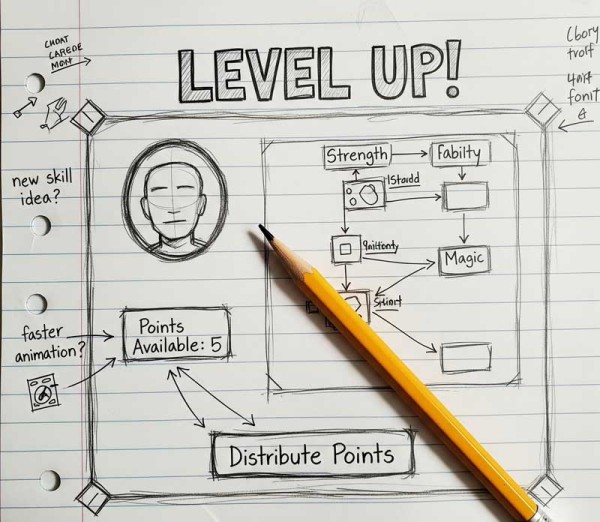 An example level up diagram that could be explored within a game.
Doing a paper app for common dialogs such as a level up dialog, allows you work with and set many early stage design pieces. For example, how the border around the dialog should look and feel.
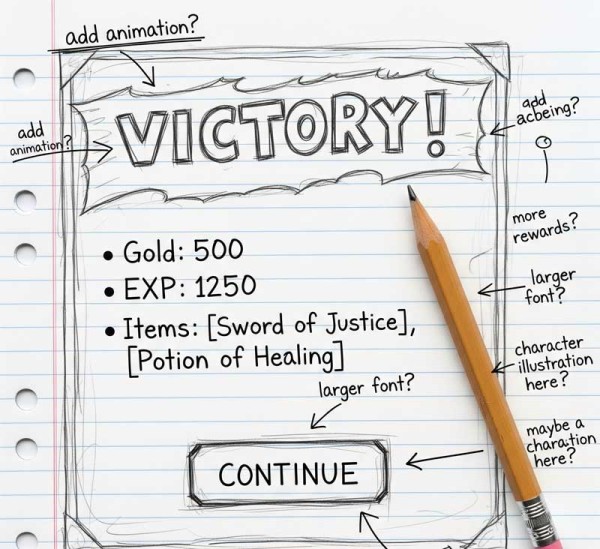
An example victory dialog that could be used after winning a battle.
The benefit of these early stage drawings is that it allows you as a game designer to see your idea start to take shape. You can easily add or remove detaisl, change directions and make edits in real time.
When to Move Beyond the "Paper App"
The paper app phase is not meant to last forever. Its purpose is to be a quick, exploratory step. The best time to move beyond the paper app and begin prototyping in computer software is when the team has a clear and shared vision of the game's core loop and user experience.
You should consider moving on when you have:
-
Finalized the core user flow and it has been validated by team walkthroughs.
-
Established a clear plan for the main menus, in-game screens, and progression systems.
-
Confirmed the game’s core mechanics and they can be clearly articulated.
-
A strong, shared agreement on the high-level art style and character direction.
Once these elements are locked down, the paper app serves as a blueprint for the more time-consuming digital prototyping phase. It becomes the foundational document that guides the work of programmers, artists, and designers, ensuring everyone is building towards the same goal.
Summary
The "paper app" is an invaluable tool in early game development. It's a low-cost, high-value method for prototyping core systems and the player's journey using simple tools like pen and paper. This phase allows for rapid iteration and testing of user flows, UI mockups, and early character designs, catching critical issues long before they become expensive to fix in a digital environment. The paper app should be used to establish a clear, shared vision for the game before the team moves on to more time-consuming digital prototyping.
Comprehension questions
 What is a "paper app" and why is it considered a low-fidelity prototype?Describe one benefit of using a paper app for testing user flows.Besides user flows and UI mockups, what is another design element that can be explored with a paper app?Based on the article, what is the key indicator that a development team should move on from the paper app phase to digital prototyping?
Review Quiz
Next Lesson
Related Content
Why Early UI Mockups are Crucial for Game Design
In the fast-paced world of video game development, the temptation is often to jump straight into coding and creating dazzling 3D models...

Course Contents : Laying the Groundwork: The Game Design Phase
- >> 5.
 The Value of a "Paper App" in Game Design