Optimizing Mobile Art and Asset Production
- -->> 5. Optimizing Mobile Art and Asset Production
What you'll learn
 Mobile Constraints and Optimization2D/3D Asset Workflow EfficiencyAnimation and Sound Effect OptimizationPipeline Tools and Collaboration
Understanding Mobile Platform Constraints
Mobile development presents a distinct set of challenges that significantly influence asset production. Devices vary widely in processing power, memory, and screen resolution, necessitating careful optimization at every stage of the pipeline. Ignoring these constraints can lead to poor performance, excessive battery drain, and a frustrating user experience.
- Performance Limitations: Mobile CPUs and GPUs are significantly less powerful than their desktop counterparts. This means artists must work within strict polygon budgets for 3D models, use simpler shaders, and employ highly optimized textures to ensure smooth frame rates. Complex visual effects common on PC may need to be simplified or faked on mobile.
- Memory Restrictions: Limited RAM is a critical factor. Large uncompressed textures, audio files, and complex scene graphs can quickly exhaust available memory, leading to crashes or sluggish performance. Aggressive compression techniques and efficient asset management are non-negotiable.
- Battery Consumption: Inefficient rendering, large asset loads, and unoptimized processes directly translate to faster battery drain. A well-optimized asset pipeline contributes significantly to a sustainable and enjoyable mobile experience, encouraging longer play sessions.
- Diverse Screen Sizes and Resolutions: Assets must be designed to scale effectively across a vast array of screen dimensions and aspect ratios, from compact smartphones to larger tablets. This requires flexible UI design, responsive layouts, and potentially multiple texture resolutions or scalable vector assets to maintain visual clarity and fidelity without bloating file sizes.
These inherent limitations demand an "optimization-first" mindset throughout the entire production cycle, influencing every artistic and technical decision.
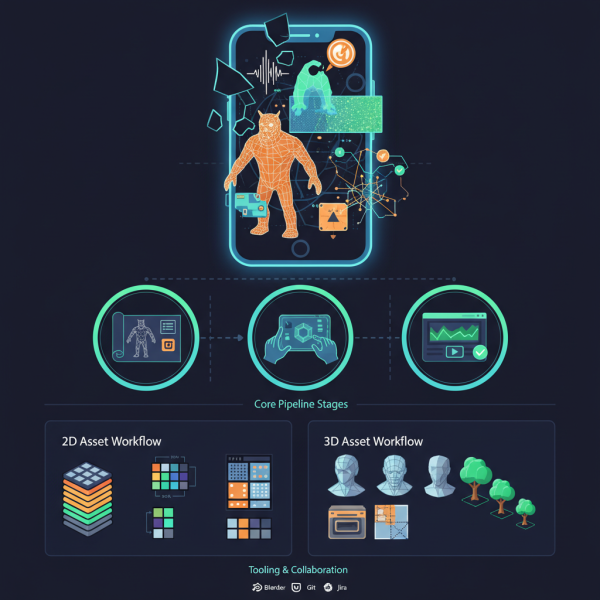
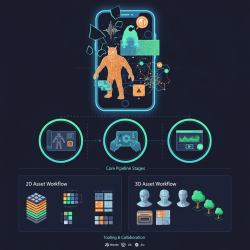
The Core Pipeline Stages
An effective art and asset production pipeline typically involves several distinct stages, each with specific tasks, deliverables, and inter-team dependencies. Clear communication and collaboration between art, design, and programming teams are crucial for seamless transitions between stages.
Pre-production: Defining the Blueprint
This initial phase is foundational. It involves comprehensive conceptualization, establishing the overall art direction, defining detailed style guides, and setting technical specifications. Key aspects include determining target polycount budgets for characters and environments, texture resolution guidelines, animation styles, and audio fidelity targets. Early prototyping and technical art explorations help validate the feasibility of visual targets and identify potential technical challenges before full production begins.
Production: Asset Creation
This is the longest and most labor-intensive phase, where artists and sound designers create the actual game assets. This includes modeling 3D objects, creating 2D sprites, texturing surfaces, rigging characters, animating movements, and recording/editing sound effects. Strict adherence to the established technical specifications and art direction is critical. Regular internal reviews and structured feedback loops are essential to ensure assets meet quality standards, fit the established style, and are technically sound for engine integration.
Post-production and Integration: Refinement and Implementation
Once assets are created, they are integrated into the game engine (e.g., Unity, Unreal Engine). This stage involves setting up materials, collision meshes, animation controllers, particle systems, and sound triggers. Assets undergo final optimization passes within the engine, performance profiling is conducted to identify and address bottlenecks, and extensive testing ensures everything functions as intended and meets the mobile performance targets. It's an iterative process of import, test, optimize, and refine.
2D Asset Workflow for Mobile
For 2D assets, efficiency and visual clarity across diverse screen sizes are paramount. The workflow focuses on streamlined sprite creation, UI elements, and background art.
Common Tools: Adobe Photoshop, Illustrator, Krita, Aseprite, Spine (for skeletal 2D animation).
Process Overview:
- Concept and Design: Start with sketches and mock-ups to define the visual style, character designs, and UI layouts.
- Creation and Refinement: Produce high-quality line art and apply colors, ensuring consistency with the overall art style.
- Optimization and Export:
- Transparent Pixels: Trim unnecessary transparent borders from images to reduce texture memory.
- Color Depth: Reduce color depth where appropriate (e.g., from 32-bit to 16-bit) if visual quality isn't compromised, to save memory.
- Sprite Sheets/Atlases: Combine multiple small sprites (e.g., character animation frames, UI icons) into a single larger texture atlas. This drastically reduces draw calls, a significant performance booster on mobile devices. Tools like TexturePacker or integrated engine atlas creators are indispensable.
- Nine-Patch Scaling: For UI elements that need to stretch without distorting corners or borders, utilize nine-patch or slice-based scaling to ensure responsiveness across different screen resolutions.
3D Asset Workflow for Mobile
3D assets demand careful consideration of polygon count, texture memory, and rendering complexity to maintain performance on mobile devices.
Common Tools: Blender, Maya, 3ds Max (for modeling, rigging, animation), ZBrush (for sculpting high-poly details), Substance Painter (for texturing).
Process Overview:
- Low-Polygon Modeling: Create models specifically targeting mobile polycount budgets. Focus on essential shapes and silhouettes, avoiding unnecessary geometry. Techniques like instancing and modularity can help reuse assets efficiently.
- UV Mapping: Generate clean, non-overlapping UV layouts for optimal texture application. Maximize UV space utilization.
- Texturing:
- While Physically Based Rendering (PBR) is gaining traction on mobile, often simplified PBR setups or stylized non-PBR textures are preferred for performance.
- Bake high-resolution details (e.g., normal maps, ambient occlusion, roughness, metallic maps) from a high-poly sculpt onto a low-poly mesh to achieve visual richness without excessive geometry.
- Utilize texture atlases for multiple 3D objects or parts of an object to further reduce draw calls.
- Employ appropriate texture resolutions (e.g., 512x512, 1024x1024) and compression formats (e.g., ASTC, ETC2, PVRTC) tailored for mobile GPUs.
- Rigging: Create an efficient skeletal structure for animated characters. Minimize the bone count as each bone adds to computation overhead during animation.
- Level of Detail (LODs): Implement multiple versions of 3D models with varying polygon counts. The game engine dynamically swaps these models based on their distance from the camera, displaying higher detail when close and lower detail when far, significantly optimizing rendering performance.
Animation Workflow for Mobile
Animations bring assets to life but can be resource-intensive if not managed correctly.
Primary Animation Types:
- Skeletal Animation: Ideal for complex character movements. Focus on minimizing bone count and keeping animation clip lengths efficient. Blend trees and state machines help manage complex animation sets.
- Sprite Sheet Animation: Excellent for 2D characters, visual effects, or even pre-rendered 3D animations converted to 2D frames. Offers good performance but can consume more texture memory if not atlased efficiently.
- Vertex Animation: Useful for specific effects like subtle foliage sway or cloth simulation that can be baked into vertex data, though less common for character animation due to larger file sizes.
Optimization Strategies: Bake complex physics or procedural animations into keyframes where possible to offload real-time calculations. Leverage animation compression features provided by game engines, which can drastically reduce animation data size without significant visual degradation. Ensure seamless looping for repetitive actions to conserve memory and smooth transitions.
Sound Effects Workflow for Mobile
High-quality audio enhances immersion, but unoptimized sound files can be memory and CPU hogs.
Common Tools: Audacity, Adobe Audition, Pro Tools.
Process Overview:
- Recording and Creation: Source or synthesize high-quality audio effects.
- Editing and Mixing: Clean up audio files, remove background noise, normalize volume levels, and apply appropriate effects.
- Optimization for Mobile:
- Compression: Use mobile-friendly audio codecs such as Ogg Vorbis or AAC at appropriate bitrates (e.g., 64-128 kbps for effects, higher for music). Avoid uncompressed WAV files for in-game assets.
- Mono vs. Stereo: For most spatial sound effects (e.g., footsteps, weapon sounds), use mono channels to halve file size. Reserve stereo for music, ambient tracks, or critical UI sounds where spatial width is essential.
- Bit Depth and Sample Rate: Lowering these (e.g., 16-bit, 22-44.1 kHz) can significantly reduce file size without a noticeable quality loss for many game sounds, especially sound effects that are brief or masked by other audio.
- Trim Silence: Remove any leading or trailing silence from audio clips.
- Integration: Implement sound effects within the game engine, setting up appropriate volume, pitch randomization, and spatialization. Utilize audio mixers and sound groups for better control over the overall soundscape and dynamic mixing.
Tooling and Collaboration in the Pipeline
A robust and efficient pipeline relies heavily on the right tools and effective collaborative practices.
- Digital Content Creation (DCC) Tools: Industry-standard software for 2D art (Photoshop, Aseprite), 3D art (Blender, Maya), and audio creation (Audacity, Audition) form the core of asset generation.
- Game Engines: Unity and Unreal Engine provide powerful integration features, extensive optimization tools, and robust asset management systems that are crucial for mobile development. They often include built-in features for texture compression, LOD management, and animation optimization.
- Version Control Systems: Git, Perforce, or SVN are indispensable for managing asset changes, enabling concurrent team collaboration, tracking history, and facilitating rollback to previous versions. Large binary assets require careful handling in these systems.
- Project Management Tools: Platforms like Jira, Trello, or Asana help track tasks, assign responsibilities, manage deadlines, and visualize dependencies across art, design, and programming teams, ensuring everyone is aligned and progress is transparent.
Summary
Establishing an efficient and well-defined art and asset production pipeline is paramount for developing high-quality, performant mobile games and applications. This article has comprehensively detailed the essential stages, from pre-production through post-production and integration, emphasizing the unique constraints inherent to mobile platforms. We explored specific workflows for creating and optimizing 2D and 3D assets, animations, and sound effects, highlighting critical techniques such as texture atlasing, low-polygon modeling, animation compression, and effective audio management. Adopting an optimization-first approach, leveraging appropriate industry-standard tools, and fostering strong interdisciplinary collaboration are not merely beneficial but absolutely paramount to delivering visually appealing, performant, and engaging mobile experiences to a diverse audience.
Comprehension questions
 What are the primary constraints mobile platforms impose on art and asset production?Explain the purpose of texture atlasing and why it is beneficial for mobile game development.What are some key optimization techniques for 3D models and animations in a mobile pipeline?How can sound effects be optimized for mobile platforms to reduce memory and CPU usage?
Review Quiz
Next Lesson

Course Contents : Mobile Game Development: From Concept to Launch
- >> 5.
 Optimizing Mobile Art and Asset Production