The Imperative of Compatibility Testing
- -->> 6. The Imperative of Compatibility Testing
What you'll learn
 Device Coverage StrategiesOperating System and Software EnvironmentsResolution and Aspect Ratio AdaptabilityTesting Methodologies and Tools
Compatibility testing, specifically focusing on device and operating system coverage, stands as a critical pillar in achieving this goal. Without a rigorous approach to testing across diverse devices, operating systems, and screen resolutions, even the most innovative and engaging game can quickly fall short, leading to player frustration, negative reviews, and ultimately, a significant impact on its commercial success and reputation.
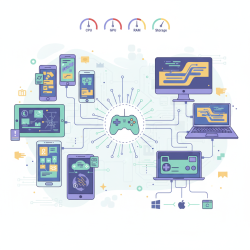
The challenge stems from the immense fragmentation of the market. From numerous Android device manufacturers with varying specifications to different versions of iOS, Windows, and even macOS, coupled with a plethora of screen sizes and aspect ratios, the permutations are nearly endless. Each unique combination presents a potential point of failure, where a game might stutter, crash, display incorrectly, or simply fail to run at all. Proactive and comprehensive compatibility testing is the developer's shield against these potential pitfalls, ensuring that the game delivers its intended experience to the widest possible audience.
Device Coverage Strategies
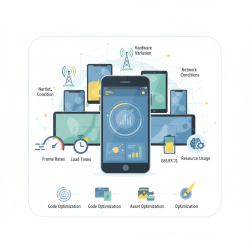
Establishing an effective device coverage strategy begins with understanding your target audience and the market landscape. It's impractical and often impossible to test on every single device. Therefore, a strategic approach is essential. This involves identifying a core set of devices that represent significant market share, popular models, and devices that cover a spectrum of hardware capabilities (e.g., high-end, mid-range, and older but still relevant models).
Developers often leverage a combination of physical device labs and cloud-based solutions or emulators. Physical labs provide the most accurate testing environment, especially for performance and specific hardware interactions. Cloud-based device farms offer scalability and access to a broader range of devices without the upfront investment. Emulators can be useful for initial functional checks but are rarely sufficient for comprehensive compatibility testing due to their inability to fully replicate real-world hardware nuances.
Key device considerations for testing:
- RAM (Random Access Memory): Affects multitasking and large game asset loading.
- CPU (Central Processing Unit): Impacts game logic, AI, and overall processing speed.
- GPU (Graphics Processing Unit): Crucial for rendering quality, frame rates, and visual effects.
- Storage Speed and Availability: Influences loading times and installation processes.
- Input Methods: Touchscreens, physical controllers, keyboards, mice.
Operating System and Software Environments
Beyond the physical device, the operating system (OS) and its various software environments play an equally critical role in compatibility. Games must perform reliably across different OS versions, including major updates, minor patches, and even beta builds that a portion of the user base might be running. Each OS update can introduce changes that affect how an application runs, handles resources, or interacts with system services.
For web-based games, browser compatibility is paramount, requiring testing across different browsers (Chrome, Firefox, Safari, Edge) and their respective versions. Furthermore, the compatibility extends to middleware and SDKs (Software Development Kits) used in the game's development, such as specific versions of game engines like Unity or Unreal Engine, and third-party libraries for analytics, advertisements, or networking. Ensuring these components are compatible with the target OS versions is crucial.
Consideration must also be given to how the game interacts with the OS's core functionalities, such as notifications, background processes, power management, and permissions. A game should gracefully handle interruptions, resume correctly, and not excessively drain battery or consume system resources, regardless of the OS version it's running on.
Resolution and Aspect Ratio Adaptability
The vast diversity in screen sizes, resolutions, and aspect ratios across devices presents a significant challenge for game UI and graphical rendering. A game designed for a specific resolution might appear stretched, cropped, or have unreadable text on another. Designing for flexibility, often termed responsive UI/UX, is a critical step, enabling the game's interface and visuals to adapt dynamically.
Testing needs to cover a wide spectrum of screen dimensions, from compact smartphone screens to large tablets and high-resolution desktop monitors. This includes testing different orientations (portrait and landscape) and ensuring that elements scale appropriately without distortion or loss of functionality. Modern displays also introduce specific quirks like notches, punch-holes, and rounded corners, which can obscure critical UI elements if not properly accounted for in the design and testing phases.
Common resolution testing pitfalls to avoid:
- Cropped UI elements or text due to incorrect scaling.
- Stretched or squashed game assets, leading to visual distortion.
- Unreadable text or icons that are too small or too large.
- Interactive areas (buttons, touch targets) becoming misaligned.
- Performance degradation at very high resolutions without proper optimization.
Testing Methodologies and Tools
A combination of manual and automated testing methodologies is typically employed for robust compatibility coverage. Manual testing allows for detailed observation of user experience, identification of subtle visual glitches, and exploration of edge cases that automated scripts might miss. It's particularly valuable for UI/UX validation across different screen sizes.
Automated testing, on the other hand, is crucial for efficiency and repeatability, especially for regression testing. It can quickly verify core functionality and performance baselines across a multitude of device-OS combinations. Tools like device farms (e.g., Firebase Test Lab, BrowserStack) integrate automated tests across real devices in the cloud, significantly accelerating the testing process.
Integrating user acceptance testing (UAT) and beta programs also provides invaluable real-world feedback on compatibility issues that might emerge from diverse user environments. These programs expose the game to a wider array of device and OS configurations than internal testing could ever hope to cover.
Best Practices for Effective Coverage
To maximize the effectiveness of compatibility testing, it should be an ongoing process integrated throughout the entire development lifecycle, rather than a final-stage afterthought. Starting early allows for identifying and addressing issues when they are less costly and complex to fix.
Leveraging continuous integration/continuous delivery (CI/CD) pipelines can automate the deployment of new builds to test environments, facilitating rapid feedback. Making data-driven decisions, utilizing analytics to understand your player base's device and OS preferences, can help refine and prioritize your testing matrix.
Regularly updating your test plans and device lists ensures that your compatibility efforts remain relevant as new devices, OS versions, and market trends emerge. A proactive and adaptive approach ensures that your game remains robust and accessible to its intended audience.
Summary
Comprehensive compatibility testing is indispensable for game development success, ensuring games run smoothly across the vast array of devices, operating systems, and screen resolutions. This article covered the necessity of such testing, strategies for effective device and OS coverage, the importance of adapting to various resolutions, and methodologies including manual and automated approaches, concluding with best practices for integrating these efforts throughout the development lifecycle to achieve broad market reach and player satisfaction.
Comprehension questions
 What are the key device considerations for compatibility testing, and why are they important?How does the article suggest addressing the challenge of market fragmentation when defining device coverage strategies?Beyond physical devices, what software environments and components must be considered for comprehensive compatibility testing?What are some common pitfalls related to resolution and aspect ratio adaptability that game developers should actively avoid?
Next Lesson

Course Contents : Mobile Game Testing Strategies
- >> 6.
 The Imperative of Compatibility Testing